Let the agent schedule
Turn an interview decision into an invitation, a candidate conversation, and a tracked booking.
The agent keeps track of the scheduling conversation: which stage the candidate is entering, what you have already told them, whether they have booked, and when a teammate needs to help.
Start with a clear instruction
Once you have decided to interview a candidate, tell the agent in the candidate's conversation:
Move Jamie to the technical interview and send the booking link. Ask them to prepare one project they owned from design to launch.
That instruction supplies the decision and the next action. With the agent enabled and the stage ready, it moves the candidate to the stage and sends the configured invitation. You can also approve the candidate through the dashboard's review flow.
Set up the process by asking
You can ask the agent to configure a stage before inviting candidates:
Add Alex and Sam to the first-interview pool. Use round-robin, make the call 30 minutes, and use Signal.
Offer technical interviews Tuesday and Thursday, 1–5 PM America/New_York. Leave 15 minutes between calls.
The agent can manage interviewer pools, assignment, availability, meeting length, buffers, conferencing, and stage instructions. If something essential is missing, such as an external booking URL or a calendar connection, it asks for that detail. Calendar connection remains a step the interviewer completes themselves.
See Set up an interview stage to make the same choices in the dashboard.
Let it handle the back-and-forth
| What happens | How the agent helps |
|---|---|
| The candidate is ready to book | Sends the stage's booking link with the interview introduction and preparation instructions. |
| The candidate asks what to prepare | Replies using the role and stage guidance you have supplied. |
| The offered times do not work | Follows your coordination instructions, gathers availability when requested, and brings in a teammate when the schedule needs human help. |
| A candidate confirms an external booking | Checks existing records, records the booking when needed, and asks for the exact time and time zone only if they are missing. |
| The candidate needs to reschedule | Uses the existing booking's reschedule link when available, or follows the external scheduler or coordinator's process. |
| A teammate takes over | Stops candidate scheduling emails while the human handoff is active. |
The agent reads the conversation before following up, so it can distinguish a candidate who has gone quiet from one who has already answered or booked.
Give each stage its own voice and instructions
In Scheduling → Agent behavior → Agent instructions, describe what candidates should know and how you want exceptions handled. For example:
This is a technical discussion, with no live coding. Ask the candidate to prepare a production system they owned. If no available slot works, collect their availability and time zone, then ask us to help.
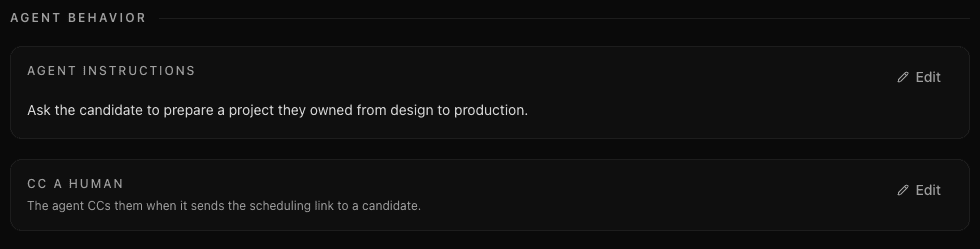
Use CC a human when someone should receive the scheduling email. In Manual mode, the copied teammate arranges the time and the agent hands over coordination.
Keep decisions with the hiring team
You approve who advances and choose the stage. The agent handles the authorized coordination; a booking does not move the candidate to the next interview stage. If the agent is turned off or candidate communication has been handed to your team, it does not send scheduling emails.
Continue to Changes and follow-ups for reminders, rescheduling, and bookings that need attention.
Last updated on