Set up a scorecard
Give each stage a clear goal and a shared standard for evaluating the conversation.
A useful interview starts with two questions: what should we learn, and what evidence would support our assessment?
Open the role's Scheduling tab, choose the stage, and find Interview scorecard. You can configure its goal and assessments even when scheduling is disabled.
Set the interview goal
Write a short description of what this conversation should establish. For example:
Explore a production system the candidate owned, including design decisions, rollout, and incident response.
Saving a goal for a stage without a scorecard generates assessments from three sources:
- FitCheck traits: the qualities that matter for this role.
- Interview goal: what you want this conversation to establish.
- Interview stage: its name, format, and instructions.
Traits marked Do not evaluate on paper take priority when relevant to the goal and stage. The interview can explore qualities that a résumé cannot establish, such as how someone makes decisions, handles disagreement, or owns a difficult outcome.
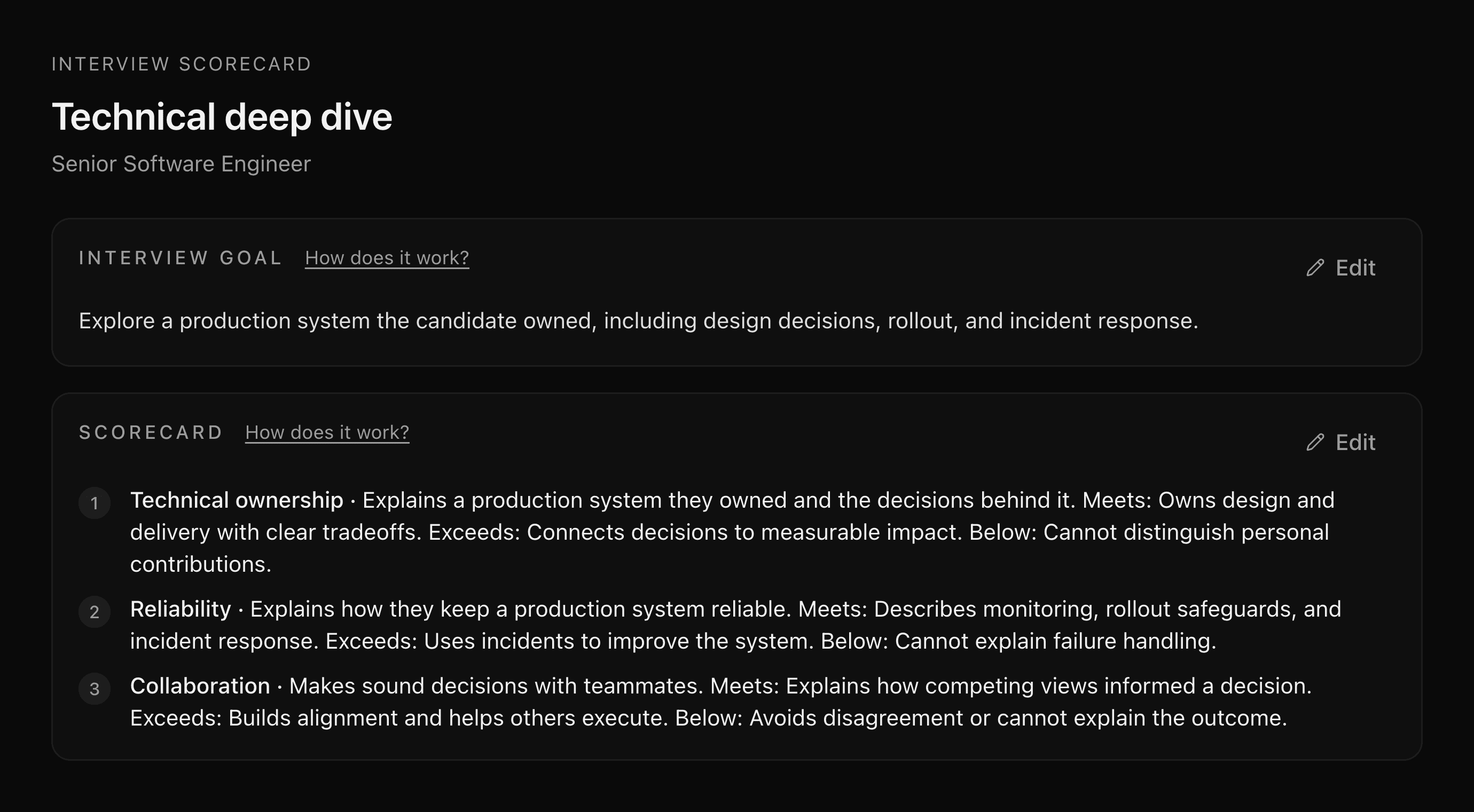
Review the scorecard assessments
Each assessment describes what to evaluate and what Below, Meets, and Exceeds look like. Use Edit to make the standards specific to your role.
| Example | Purpose | |
|---|---|---|
| Assessment | Explains their own design decisions and the tradeoffs involved. | Gives interviewers a shared standard. |
| Question | Walk me through a system you led from design to launch. Which tradeoffs did you own? | Helps the candidate provide evidence for that assessment. |
You can also ask the agent to generate or update the stage's scorecard. Give it the goal and the context that should shape the assessments:
Generate a scorecard for the technical deep dive. Focus on production-system ownership, rollout decisions, and incident response, using the role's FitCheck traits.
Changing a goal does not automatically replace existing assessments. Review and edit them, or ask the agent to regenerate them for the revised goal.
Prepare for each candidate
Superposition uses the stage's scorecard and the candidate's background to prepare questions for their scheduled interview. Candidate-specific questions explains where to find them and how they connect to the assessment standards.
Changes to the stage scorecard do not replace questions already prepared for a scheduled interview. Review those questions before the call if you have recently changed the stage's goal.
During a Signal call, use the interview scorecard to move between prepared questions and your assessment. After the conversation, finish your scorecard while the evidence is fresh.
Last updated on