The candidate experience
What candidates see before, during, and after a Signal interview.
Candidates join from the link in their interview confirmation. Their pre-join page focuses on getting ready for the call: their name, camera preview, and audio devices.
Before joining
The candidate can turn their microphone and camera on or off, choose devices, and check their displayed name. The recording notice appears below Join interview.
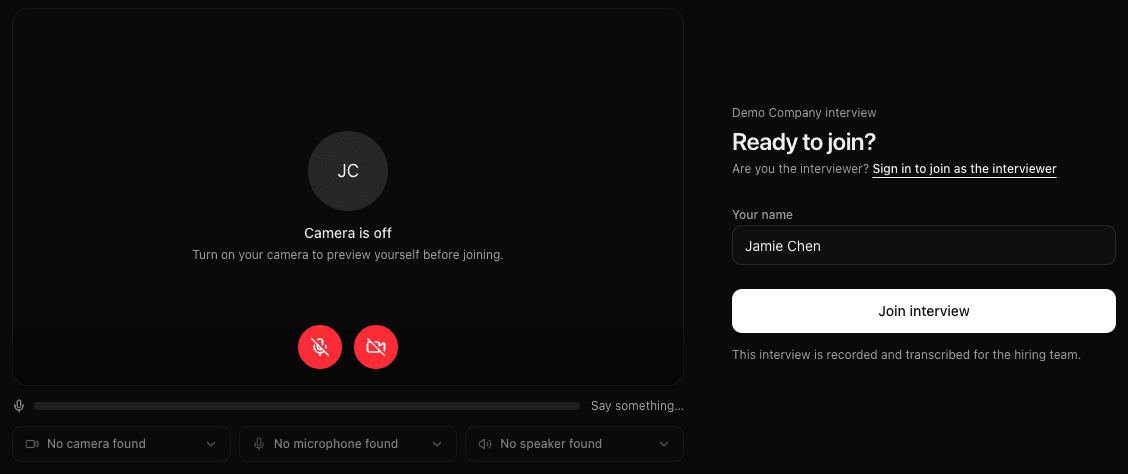
After selecting Join interview, the candidate enters the room. If the stage has a waiting room enabled, they wait for an interviewer to admit them.
During the conversation
Candidates take part in the call using the room's participant controls. They do not see the interviewer's preparation or hiring-team assessment.
| Visible to the candidate | Kept on the interviewer side |
|---|---|
| Their device preview and displayed name | The candidate profile and timeline opened from the interviewer page |
| The recording notice | Prepared interview questions and the scorecard |
| The call and participant controls | Scorecards and hiring-team feedback |
Opening Interview scorecard does not display it to the candidate. If you share your screen, choose the window you intend the candidate to see.
After leaving
Candidates leave through the room's red phone button. Their exit screen does not offer the interviewer's scorecard or feedback page.
For help getting into the room, use Joining and device help. To understand the recording notice, see Recordings and transcripts.
Last updated on